
It is notable that even the most experienced technology professionals often hesitate when trying to define where Identity and Access Management (IAM) begins, and perhaps the most common mistake is believing that the discipline is limited to configuring market tools or resetting user passwords. To start a solid career in the field, the professional needs to understand how systems structure, validate, and authorize each data request.
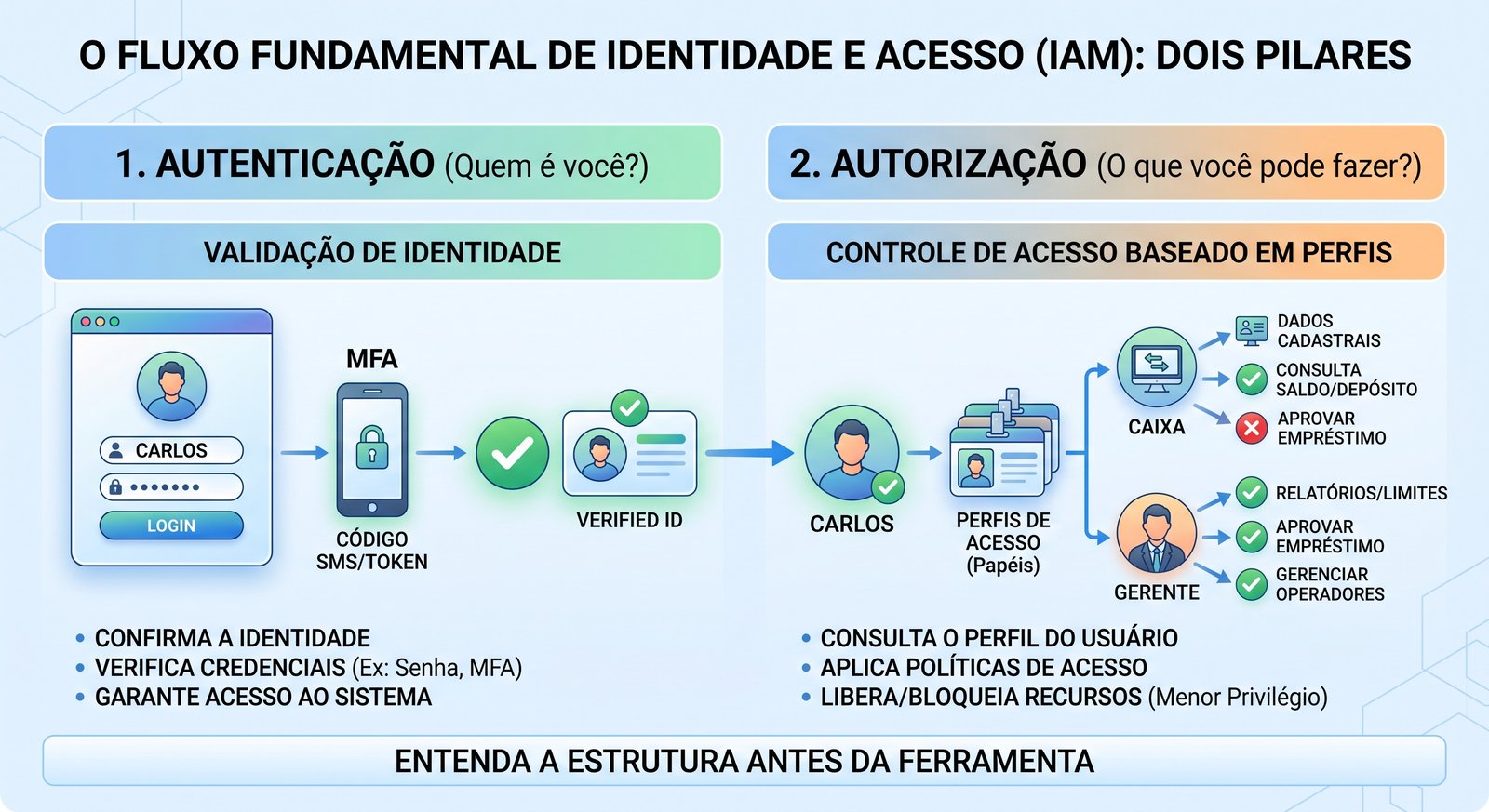
A user's access flow to a system generally follows two consecutive steps: the authentication (who the user is) and the Authorization (what they can do).
Process Steps
-
Authentication: The system captures and validates the identity presented by the user through credentials and, sometimes, even additional factors that go beyond just username + password.
-
Authorization: After confirming the validity of the identity, the system consults internal access policies and linked permissions to allow or restrict the use of specific resources.
Understanding in Practice: The Example of a Banking System
To visualize this flow in a simple way, think of a bank's internal system:
1. Authentication (Who is the user?)
When a bank teller logs in, entering their username, password, and validating an extra code (MFA Token), the system performs the authentication. It only checks: "Is this person really Carlos?". Once this identity is validated, the gateway to the system is opened.
2. Authorization and Access Profiles (What can the user do?)
Being authenticated does not mean having access to everything. This is where access permissions come in, which within a system are typically associated with access profiles (roles/functions):
-
Teller Profile: Has permission to perform some operations such as registering day-to-day deposits and withdrawals; however, through permissioning rules, the interface blocks other more critical operations, such as loan approval, for example.
-
Manager Profile: Through permissioning rules, can approve credit lines up to a certain value (approval limits), but does not have permissions to access the system's infrastructure configurations.
This way, the system checks the profile assigned to the user to enable only the buttons, screens, and data necessary for their work.
Access Management Starts with Structure
Many companies still create and grant access manually via support tickets. This is not a problem in itself.
The real risk is not in the process being manual, but rather in the lack of clear criteria and definitions:
-
Granting loose permissions directly to the user without defining standardized profiles. In some systems, operations can be assigned directly to users without the need to create a profile; the tip here is not to follow this approach.
-
Copying access from another colleague without knowing what is being granted ("give them the same access as so-and-so"). User mirroring should not be an option in the company's access management.
-
Failing to minimally document which profiles exist in the system, which permissions each one encompasses, and a clear and concise description of what that profile authorizes.
Understanding the anatomy of authentication and authorization helps you organize the house or the chaos: map the necessary profiles, clearly define who can access each module, and ensure that each account receives only the profile appropriate to its job function.
Where to Focus Your Studies
If you want to build a solid foundation before moving on to more complex topics:
-
Clearly understand and separate the concepts: Always remember that authentication validates identity, while authorization validates permission.
-
Discover and analyze the systems you use today: Observe how the applications you manage divide access (which screens a regular user sees compared to an administrator).
-
Practice profile standardization: Whenever you need to grant access, think in terms of functional profiles and the actual needs of the role, rather than one-off exceptions.